Features That Earn Money for the Practice and Save Nurse Time

No unnecessary features. Just tools that put no-show money back in the owner's pocket and give nurses more time to work.

Features That Earn Money for the Practice and Save Nurse Time

What Zuboklik Can Do Compared to Others

Comparison with competition

We compare only the booking and appointment part — Zuboklik runs alongside practice management systems, it does not replace them. We include universal online booking tools as well as the built-in booking modules of the major Czech practice management systems.

Online booking by patient

Zuboklikcheck_circle
ClickDoccheck_circle
Planfycheck_circle
Reserviocheck_circle
Bookluxcheck_circle
zubari.onlinecheck_circle
XDENTcheck_circle
Dent21Module +490 CZK/month
PC DENTOnly via ClickDoc
DENTIST+Only via ClickDoc
DentMaxVia NavstevaLekare.cz

Instant booking without reception approval

Zuboklikcheck_circle
ClickDoccancel
Planfycancel
Reserviocancel
Bookluxcancel
zubari.onlinecancel
XDENTOptional (manual by default)
Dent21cancel
PC DENTcancel
DENTIST+cancel
DentMaxcancel

PIN instead of password

Zuboklikcheck_circle
ClickDoccancel
Planfycancel
Reserviocancel
Bookluxcheck_circle
zubari.onlinecancel
XDENTcancel
Dent21cancel
PC DENTcancel
DENTIST+cancel
DentMaxcancel

Biometric login (Face ID / Touch ID)

Zuboklikcheck_circle
ClickDoccancel
Planfycancel
Reserviocancel
Bookluxcancel
zubari.onlinecancel
XDENTcancel
Dent21cancel
PC DENTcancel
DENTIST+cancel
DentMaxcancel

Intelligent time combination by symptoms+ urgency + insurance

Zuboklikcheck_circle
ClickDoccancel
Planfycancel
Reserviocancel
Bookluxcancel
zubari.onlinecancel
XDENTcancel
Dent21cancel
PC DENTcancel
DENTIST+cancel
DentMaxcancel

Cancellation fees with automatic enforcementSMS + QR, escalation

Zuboklikcheck_circle
ClickDoccancel
Planfycancel
Reserviocancel
Bookluxcancel
zubari.onlinecancel
XDENTcancel
Dent21cancel
PC DENTcancel
DENTIST+cancel
DentMaxcancel

Automatic bank payment matching

Zuboklikcheck_circle
ClickDoccancel
Planfycancel
Reserviocancel
Bookluxcancel
zubari.onlinecancel
XDENTcancel
Dent21Module 8 990 CZK (from e-mail)
PC DENTcancel
DENTIST+cancel
DentMaxcancel

Blocking of no-shows

Zuboklikcheck_circle
ClickDoccancel
Planfycancel
Reserviocancel
Bookluxcancel
zubari.onlinecancel
XDENTcancel
Dent21cancel
PC DENTcancel
DENTIST+cancel
DentMaxcancel

AI assistant for staff

Zuboklikcheck_circle
ClickDoccancel
Planfycancel
Reserviocancel
Bookluxcancel
zubari.onlinecancel
XDENTcancel
Dent21Different (AI phone 19 990 + 7 990/month)
PC DENTcancel
DENTIST+cancel
DentMaxcancel

Trash and restore for deleted records

Zuboklikcheck_circle
ClickDoccancel
Planfycancel
Reserviocancel
Bookluxcancel
zubari.onlinecancel
XDENTcancel
Dent21cancel
PC DENTcancel
DENTIST+cancel
DentMaxcancel

Intelligent time calculation by symptoms

Zuboklikcheck_circle
ClickDoccancel
Planfycancel
Reserviocancel
Bookluxcancel
zubari.onlinecancel
XDENTMinute-based calculation
Dent21Preset time per procedure
PC DENTcancel
DENTIST+cancel
DentMaxcancel

Text search for appointments in natural language

Zuboklikcheck_circle
ClickDoccancel
Planfycancel
Reserviocancel
Bookluxcancel
zubari.onlinecancel
XDENTcancel
Dent21Form-based (supports series with gaps)
PC DENTcancel
DENTIST+cancel
DentMaxcancel

Family accounts (book whole family)

Zuboklikcheck_circle
ClickDoccancel
Planfycancel
Reserviocancel
Bookluxcheck_circle
zubari.onlinecancel
XDENTcancel
Dent21Module (individual)
PC DENTcancel
DENTIST+cancel
DentMaxcancel

Acute gaps (automatically created)

Zuboklikcheck_circle
ClickDoccancel
Planfycancel
Reserviocancel
Bookluxcancel
zubari.onlinecancel
XDENTcancel
Dent21cancel
PC DENTcancel
DENTIST+cancel
DentMaxcancel

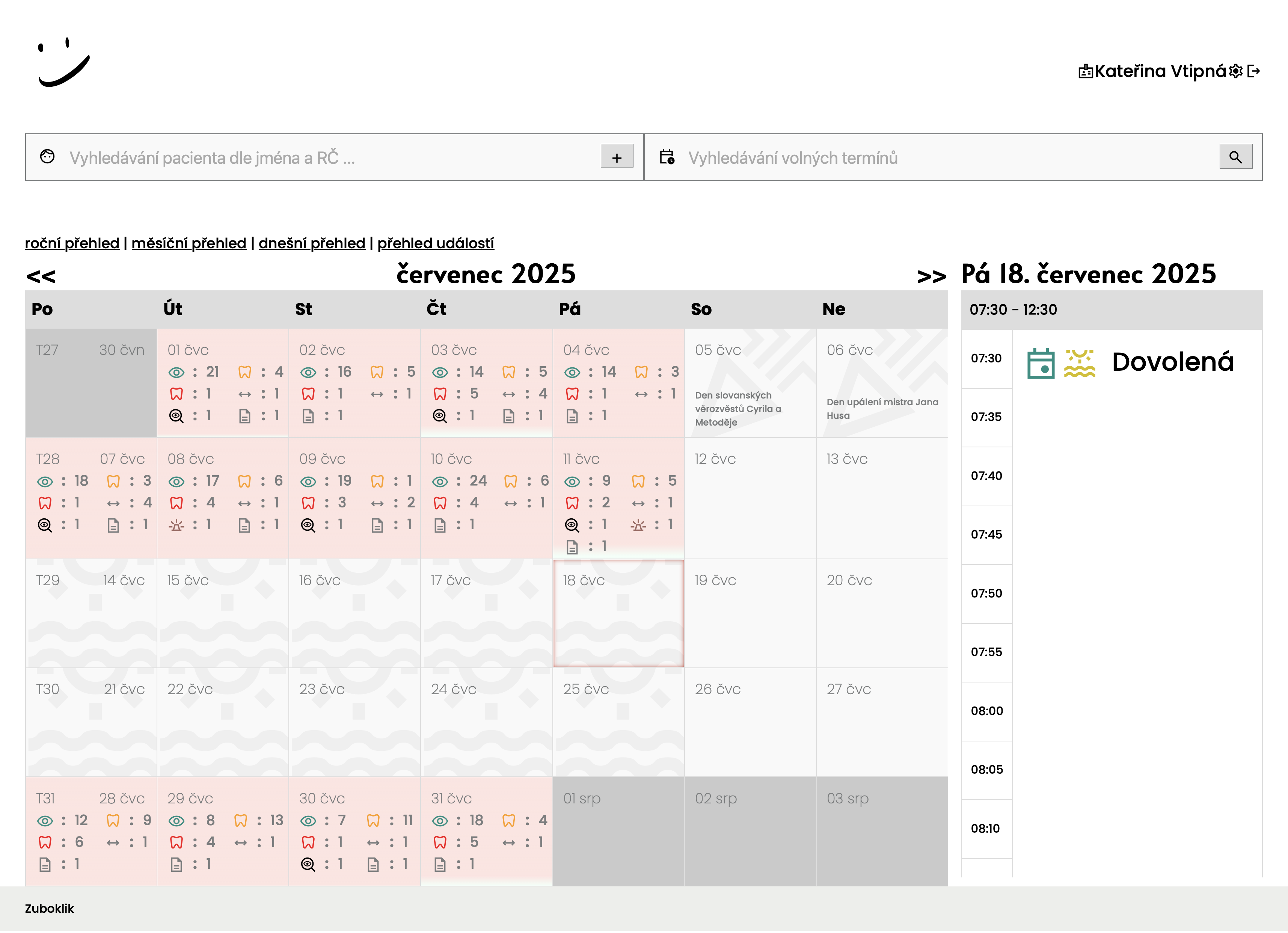
Free/booked ratio for each day

Zuboklikcheck_circle
ClickDocOnly fully booked
PlanfyOnly fully booked
ReservioOnly fully booked
BookluxColor distinction
zubari.onlinecancel
XDENTcancel
Dent21cancel
PC DENTcancel
DENTIST+cancel
DentMaxcancel

Monthly view with visit type icons

Zuboklikcheck_circle
ClickDoccancel
Planfycancel
Reserviocancel
Bookluxcancel
zubari.onlinecancel
XDENTcancel
Dent21cancel
PC DENTcancel
DENTIST+cancel
DentMaxcancel

Special daily overview for doctor

Zuboklikcheck_circle
ClickDoccancel
Planfycancel
Reserviocancel
Bookluxcancel
zubari.onlinecancel
XDENTcancel
Dent21cancel
PC DENTcancel
DENTIST+cancel
DentMaxcancel

Yearly calendar view

Zuboklikcheck_circle
ClickDoccancel
Planfycancel
Reserviocancel
Bookluxcancel
zubari.onlinecancel
XDENTcancel
Dent21cancel
PC DENTcancel
DENTIST+cancel
DentMaxcancel

Conflict detection when changing work hours

Zuboklikcheck_circle
ClickDoccancel
Planfycancel
Reserviocancel
Bookluxcancel
zubari.onlinecancel
XDENTcancel
Dent21cancel
PC DENTcancel
DENTIST+cancel
DentMaxcancel

Real-time synchronization without refresh

Zuboklikcheck_circle
ClickDoccancel
Planfycheck_circle
Reserviocheck_circle
Bookluxcheck_circle
zubari.onlinecancel
XDENTcancel
Dent21cancel
PC DENTcancel
DENTIST+cancel
DentMaxcancel

Waitlist with SMS offer

ZuboklikAutomatic SMS + link
ClickDoccancel
Planfycancel
Reserviocancel
Bookluxcancel
zubari.onlinecancel
XDENTHas waitlist, SMS automation unverified
Dent21cancel
PC DENTcancel
DENTIST+cancel
DentMaxcancel

Dynamic symptom reordering

Zuboklikcheck_circle
ClickDoccancel
Planfycancel
Reserviocancel
Bookluxcancel
zubari.onlinecancel
XDENTcancel
Dent21cancel
PC DENTcancel
DENTIST+cancel
DentMaxcancel

Vacations with online booking blocking

Zuboklikcheck_circle
ClickDoccancel
Planfycheck_circle
ReservioLimited
Bookluxcheck_circle
zubari.onlinecheck_circle
XDENTcancel
Dent21cancel
PC DENTcancel
DENTIST+cancel
DentMaxcancel

Notes for the day

Zuboklikcheck_circle
ClickDoccancel
Planfycancel
Reserviocancel
Bookluxcheck_circle
zubari.onlinecancel
XDENTcancel
Dent21cancel
PC DENTcancel
DENTIST+cancel
DentMaxcancel

Self-service cancellation / move appointment online

Zuboklikcheck_circle
ClickDoccancel
Planfycancel
Reserviocancel
Bookluxcancel
zubari.onlinecancel
XDENTcancel
Dent21cancel
PC DENTcancel
DENTIST+cancel
DentMaxcancel

Save calendar invite

Zuboklikcheck_circle
ClickDoccancel
Planfycancel
Reserviocancel
Bookluxcancel
zubari.onlinecancel
XDENTcancel
Dent21cancel
PC DENTcancel
DENTIST+cancel
DentMaxcancel

Online booking languages

ZuboklikCZ + EN
ClickDoccancel
Planfycancel
Reserviocancel
Bookluxcancel
zubari.onlinecancel
XDENT6 languages (per FAQ)
Dent21cancel
PC DENTcancel
DENTIST+cancel
DentMaxcancel

SMS notifications

Zuboklik1.20 CZK/SMS
ClickDocOn request
PlanfyCredit 0.05-0.07 £/SMS
ReservioCredit separately
BookluxBy plan
zubari.onlinefrom 1.60 CZK/SMS
XDENT2.99 CZK/SMS, UNLIMITED free
Dent21Included (1.10 CZK off-switchboard)
PC DENTCGMesky separately
DENTIST+CGMesky separately
DentMaxIncluded

Insurance rules

Zuboklikcheck_circle
ClickDoccancel
Planfycancel
Reserviocancel
Bookluxcancel
zubari.onlinecancel
XDENTcancel
Dent21cancel
PC DENTcancel
DENTIST+cancel
DentMaxcancel

Type of system

ZuboklikBooking system alongside practice SW
ClickDocUniversal online booking
PlanfyUniversal online booking
ReservioUniversal online booking
BookluxUniversal online booking
zubari.onlineBooking system for dental practices
XDENTComplete practice management SW
Dent21Complete practice management SW
PC DENTComplete practice management SW (desktop)
DENTIST+Complete practice management SW (desktop)
DentMaxComplete practice management SW (cloud)

Zuboklik combines the most important tools for booking in private dental practice

Zuboklik's Flagship Feature

Cancellation fees that collect themselves

The only feature that directly puts money in your pocket. Every no-show is automatically turned into a recovered amount. No phone calls, no paperwork, no lawyers.

Real impact on your practice

Every no-show =CZK 1,500–3,000lost

With 6 no-shows per month, that's CZK 108,000–216,000 per year Zuboklik helps you recover — automatically.

receipt_long
1

Automatic fee on no-show

The system creates the cancellation fee the moment a patient doesn't show up for their appointment. Neither nurse nor doctor has to do anything — the fee is created, assigned to the patient and an SMS with QR payment is sent.

No manual phone calls to patients
Fee created within seconds
Administration reduced to zero
All unsettled fees visible in one place
lightbulb

Mr. Svoboda didn't show for his 10:00 Tuesday prevention. The practice has 30 empty minutes and no replacement. Zuboklik at 10:05 automatically created a CZK 1,500 cancellation fee, sent the patient an SMS with QR code and waits for payment.

Typical nurse time saved

10 hrs/month

vs. manual collection by phone

verified
2

Legal certainty via consent at booking

The patient agrees to the cancellation fee amount at the time of booking. In case of a dispute, you have clear proof that the patient knew the terms in advance and agreed to them. No lawyers, no arguments.

Patient agrees to the amount when booking
In a dispute, terms agreed in advance are proof
Compliant with Czech legislation
Transparent rules for all patients
lightbulb

Mrs. Dvořáková claims she didn't know about the cancellation fee. Zuboklik shows in the patient card the date and time the terms were accepted. Dispute resolved in 30 seconds.

Disputes resolved without escalation

99%

of all cases settled at first contact

qr_code_scanner
3

SMS with QR payment & escalation reminders

Patient receives an SMS with variable symbol and QR code for instant payment. If they don't pay, the system sends a reminder after 3 days, and a second one after 7 days. The escalation is fully automatic.

Patient pays with one click from their phone
QR code works with all Czech banks
Automatic escalation reminders on day 3 and 7
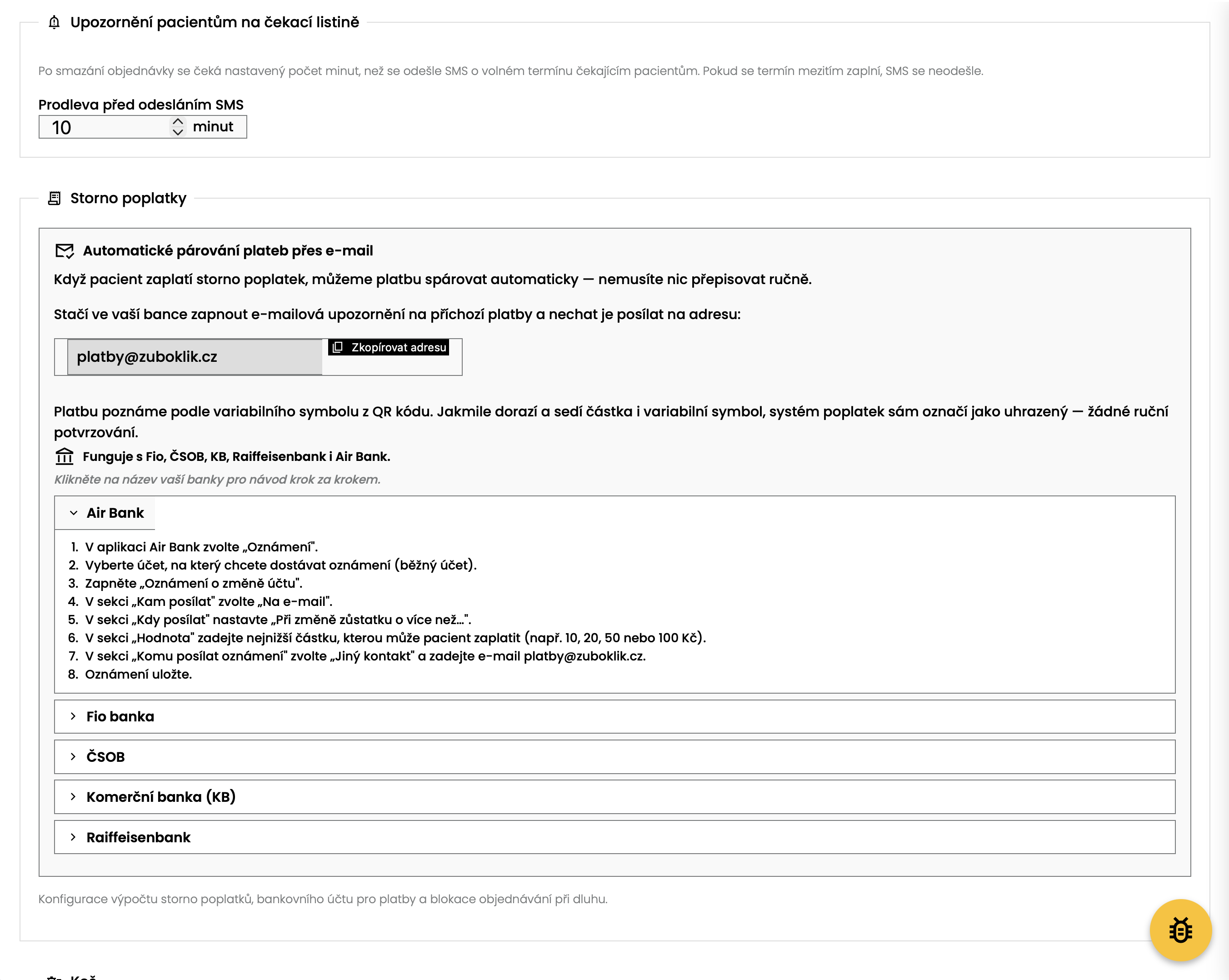
Fio, ČSOB and KB — guide for each bank
lightbulb

Mr. Novák got an SMS with QR code. He opened it in his KB app, scanned the QR and paid within 15 seconds. Nurse didn't have to do anything.

How it works

SMS with QR code + escalation

Day 1 · Initial SMS

You missed your appointment on Jul 14 at 10:00. Cancellation fee CZK 1,500. VS: 1234567890

QR code for payment attached

+3 days

refresh

Day 3 · Reminder

Still unpaid. Please settle within 4 days. Same QR code in this SMS.

+4 days

priority_high

Day 7 · Final notice

Last warning before block. If unpaid, the safety net will be activated.

bolt

Fully automatic — no phone calls from the nurse

sync_alt
4

Automatic bank-payment matching

Zuboklik connects to Fio bank via API and checks for new payments every few minutes. As soon as a payment arrives with the right variable symbol and message, the system matches it to the cancellation fee and marks it as paid. For ČSOB and KB it works via e-mail notification with a step-by-step guide for the bank.

Fio API — fully automatic matching
ČSOB and KB — e-mail notifications with guides
No more manual bank-statement checks
Instant view of settled fees
lightbulb

Mrs. Procházková paid by transfer from ČSOB. Zuboklik sent her a guide on how to include 'Zuboklik: poplatek za zmeskani VS1234567890' in the recipient message. The bank sent an e-mail and the system matched the fee within 5 minutes.

How it works

Bank payment matching

Patient's bank

Fio, ČSOB, KB, Raiffeisenbank, Air Bank

Fio API / e-mail notice

sync_alt

Zuboklik matcher

Checks for new payments every 5–15 minutes

VS + amount

Cancellation fee

Marked as paid

schedule

Full match in 5 minutes, no manual work

block
5

Block debtors + 'I already paid' safety net

A patient with an unsettled cancellation fee cannot book online again. If a patient claims they've already paid but the system hasn't yet matched the payment (slow bank), you have a safety net: verify the payment in the records and, in extreme cases, manually allow the booking.

Debtors can't book — you protect your time
Safety net against wrong block
Overview of all debtors in the admin
Automatic unblock after payment match
lightbulb

Mr. Svoboda has an unsettled fee and wants to book. The system shows him 'Unsettled cancellation fee' when he tries. If he claims he paid, the nurse verifies in the bank and can unblock with one click.

How it works

Debtor block + safety net

Debtor with unsettled fee

System shows 'Unsettled cancellation fee' on booking attempt

Claims: 'I already paid'

verified_user

Nurse verifies in the bank

One click to confirm payment, or manually unblock if justified

Bank confirms the payment

Automatically unblocked

Patient can book again

shield

Safety net for slow banks — no patient is ever stuck

history_edu
6

Settle, forgive & audit trail

From the patient card, settle the fee in one click — or forgive it with a mandatory note (why forgiven). The complete audit trail shows who did what when — in case of a dispute you have proof.

Settle in one click from the patient card
Forgive with mandatory reason (for documentation)
Audit log of who/when/what changed
Ready reports for accounting
lightbulb

Mr. Horák apologized — he had a serious family situation. Nurse opened his card, clicked 'Forgive' and entered 'Family emergency, first incident'. The fee was reflected in the report and everything was logged for any future audit.

Audit records per fee

5+

full history reconstruction for any dispute

For Patients

Simple Online Booking

Your patients book themselves, whenever they need. No waiting on phone, no closed practice.

key

PIN login instead of password

Patients log in using birth number or dental number. No forgetting passwords, no resets. For the most convenient experience, biometric login (Face ID / Touch ID) is also available - fingerprint or face, no typing required. Verified to work for all generations - from children to seniors.

PIN, or simply Face ID / Touch ID
Login with fingerprint or face
90% fewer login problems
No forgotten passwords
Simple even for seniors
Language switcher for patient (EN) – for foreigners and bilingual families
Alternative to birth number: dental number for foreigners and patients who prefer not to enter their birth number
lightbulb

Mr. Novák (65 years) needs to book dentist. Opens link, enters birth number and is logged in. Next time he just places his finger on the reader (Touch ID) and is done. No password, no complications.

PIN login instead of password
checklist

Intelligent time by symptoms

Patient selects from clearly formulated symptoms (fallen filling, tooth pain, gum bleeding). System intelligently calculates required time from symptoms and finds suitable appointment.

Accurate time slots without your intervention
Fewer calls asking 'how long will it take'
Reduced delays in practice
lightbulb

Patient marks 'fallen filling' and 'pain when biting'. System knows the symptoms are related and needs 25 minutes for procedure. Offers only appointments with sufficient time.

Intelligent time by symptoms
family_restroom

Family accounts

Parent can book entire family from one account. Sees all appointments of children, partner and grandparents. Can send invitations to family members via SMS.

All family appointments in one place
Simpler management for parents
Fewer accounts to remember
lightbulb

Mrs. Svobodová books check-up for herself, son (8 years) and daughter (12 years). Sees all three appointments in one calendar. Daughter gets SMS with invitation and can see appointment too.

Family accounts
calendar_month

Calendar with daily availability

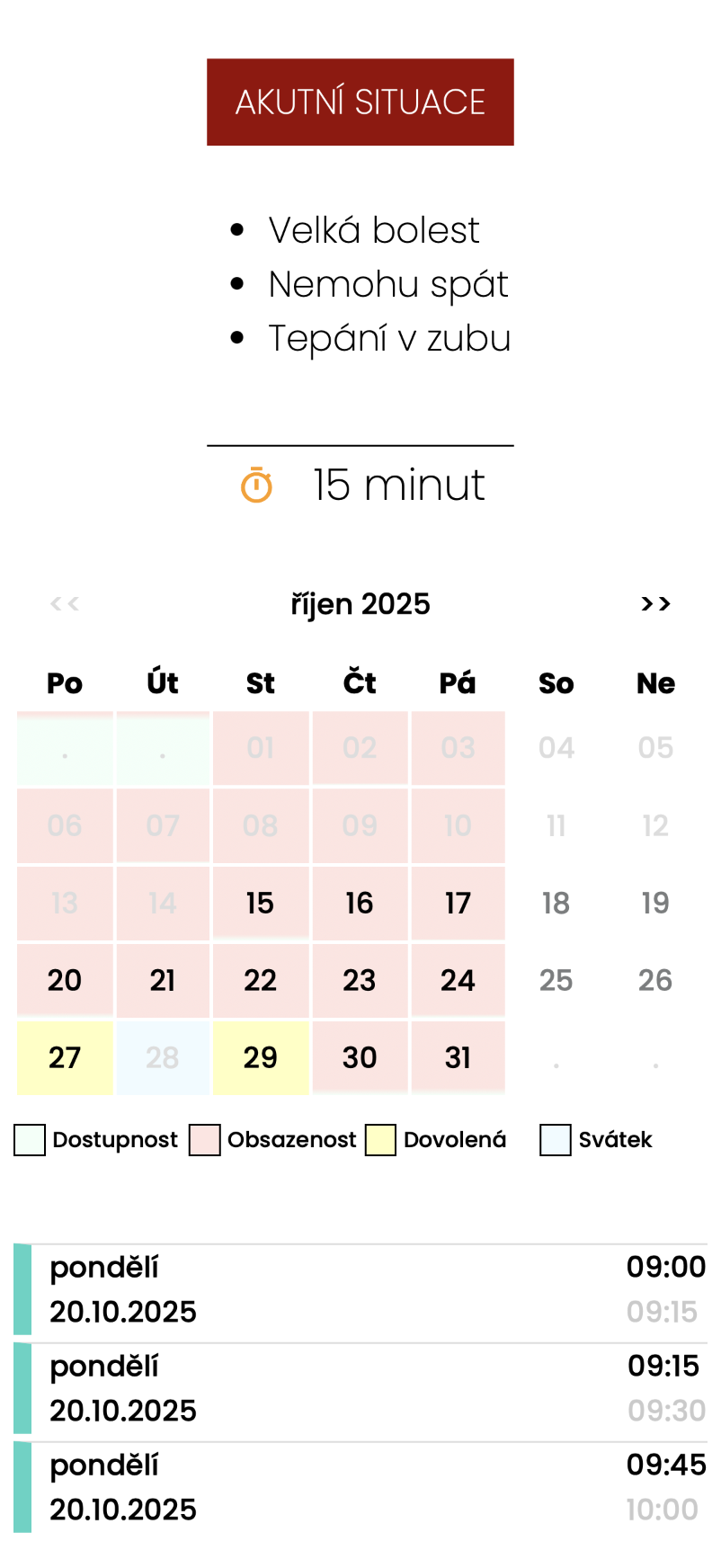
Patients see monthly calendar with color-coded availability for each day. Each day shows ratio of free and booked slots - light green means available, light red means booked. They immediately see which days have most free slots or when there's vacation.

Instant visual overview of each day's availability
Color distinction free (green) vs booked (red)
Faster appointment selection - see best days at glance
Patients don't need to click on fully booked days
lightbulb

Mr. Novák needs appointment next week. In calendar he sees Monday is all red (fully booked), Tuesday has small green part (almost full), but Thursday is half green (lots of availability). He clicks Thursday and chooses from many available times. Saves unnecessary clicking.

Calendar with daily availability
emergency

Acute gaps

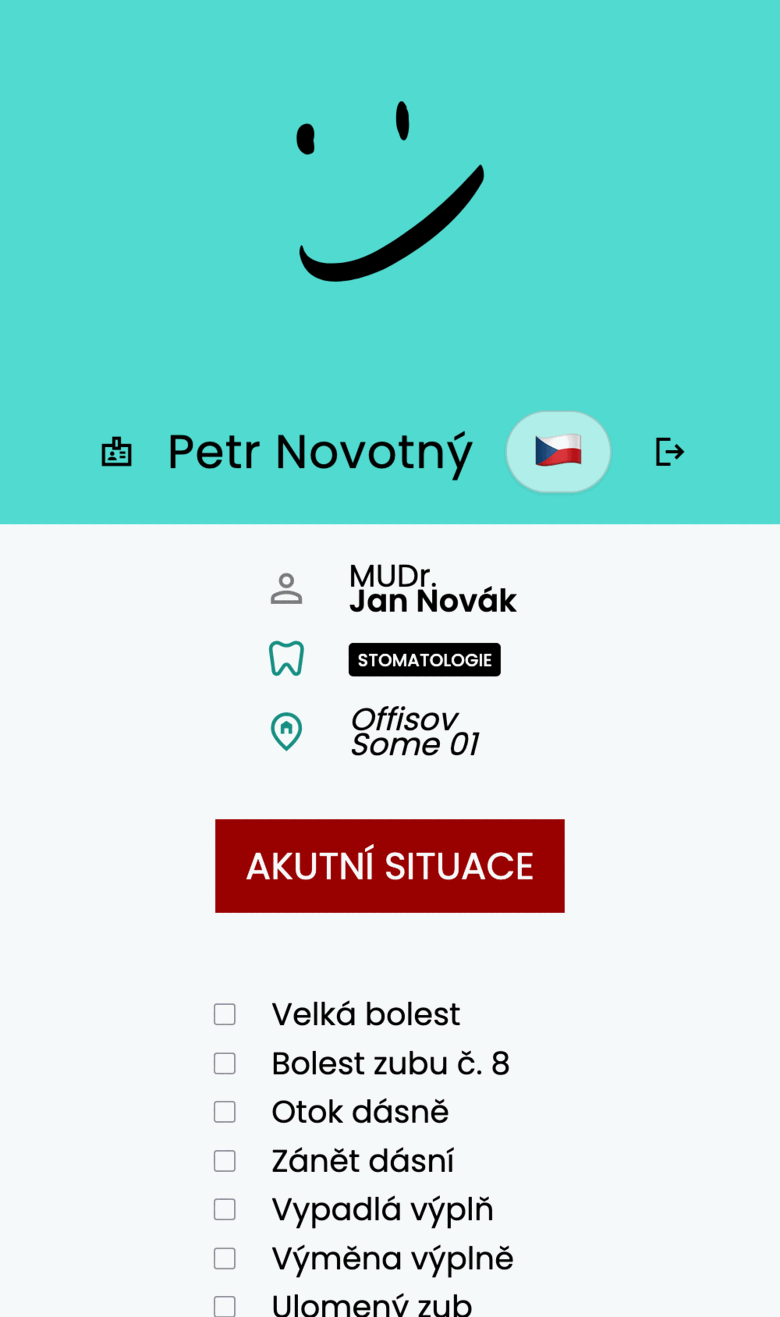
Patient needs help right away? They search for acute appointment. Practice reserves free time for acute cases that come during the day. When nobody comes, time is used normally.

Option for patients with urgent symptoms to find appointment immediately
Flexible time reserve for acute cases
Automatic acute appointment search in system
Patients don't need to call the practice
lightbulb

Mr. Svoboda has severe tooth pain at night. In morning he logs into Zuboklik, enters symptoms and search immediately offers 'Acute appointment today 9:00'. Practice has reserve and patient gets help same day.

Acute gaps
playlist_add

Waitlist

Patient can sign up for waitlist if no suitable appointment is found. When slot becomes available, system automatically sends SMS with offer. Patient can accept appointment directly from SMS with one click.

SMS notification when appointment becomes available
Accept appointment directly from SMS link
Option to unsubscribe from waitlist anytime
Automatic process without nurse intervention
lightbulb

Mrs. Smith needs appointment next Tuesday but it's fully booked. She signs up for waitlist. On Monday someone cancels and system automatically sends SMS: 'Appointment available Tuesday 10:00 - click here to book'. Mrs. Smith clicks and has it reserved.

Waitlist
sms

Automatic SMS reminders

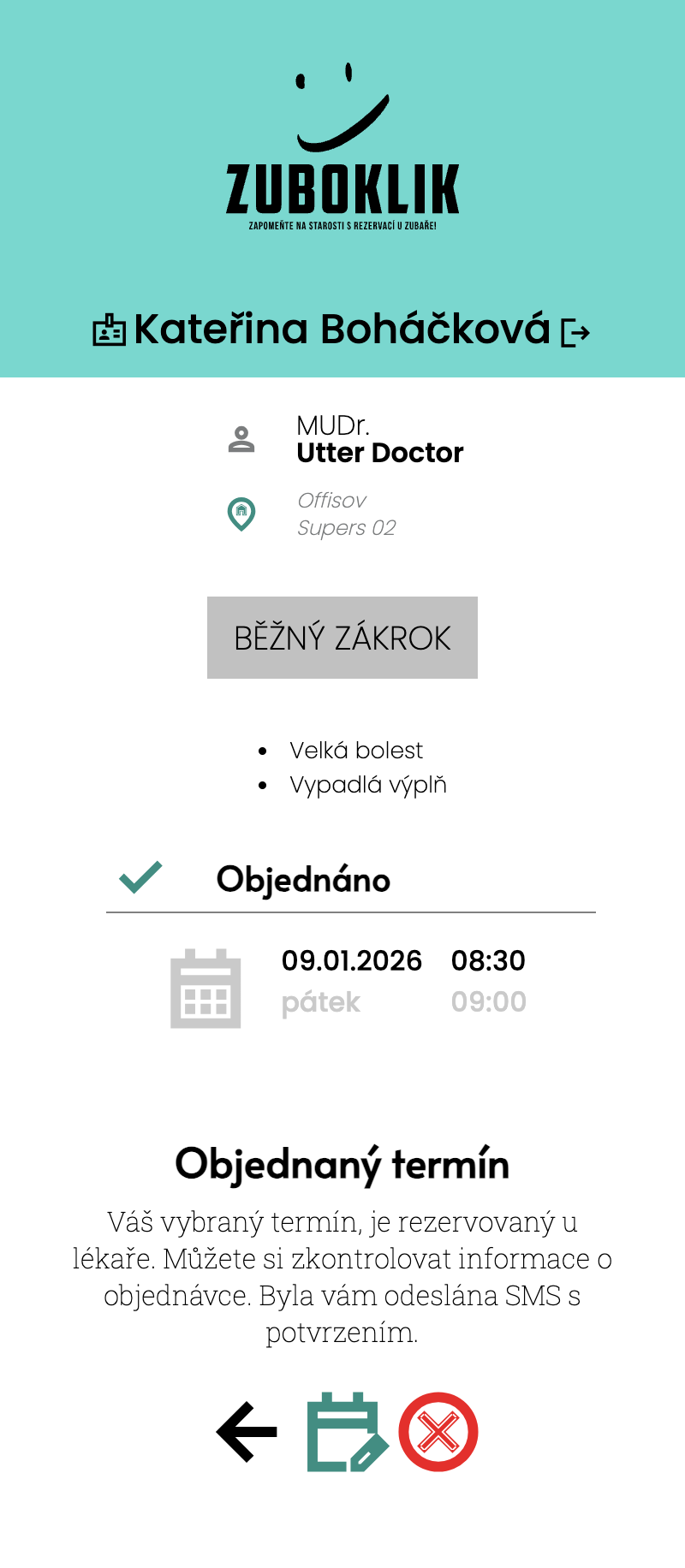
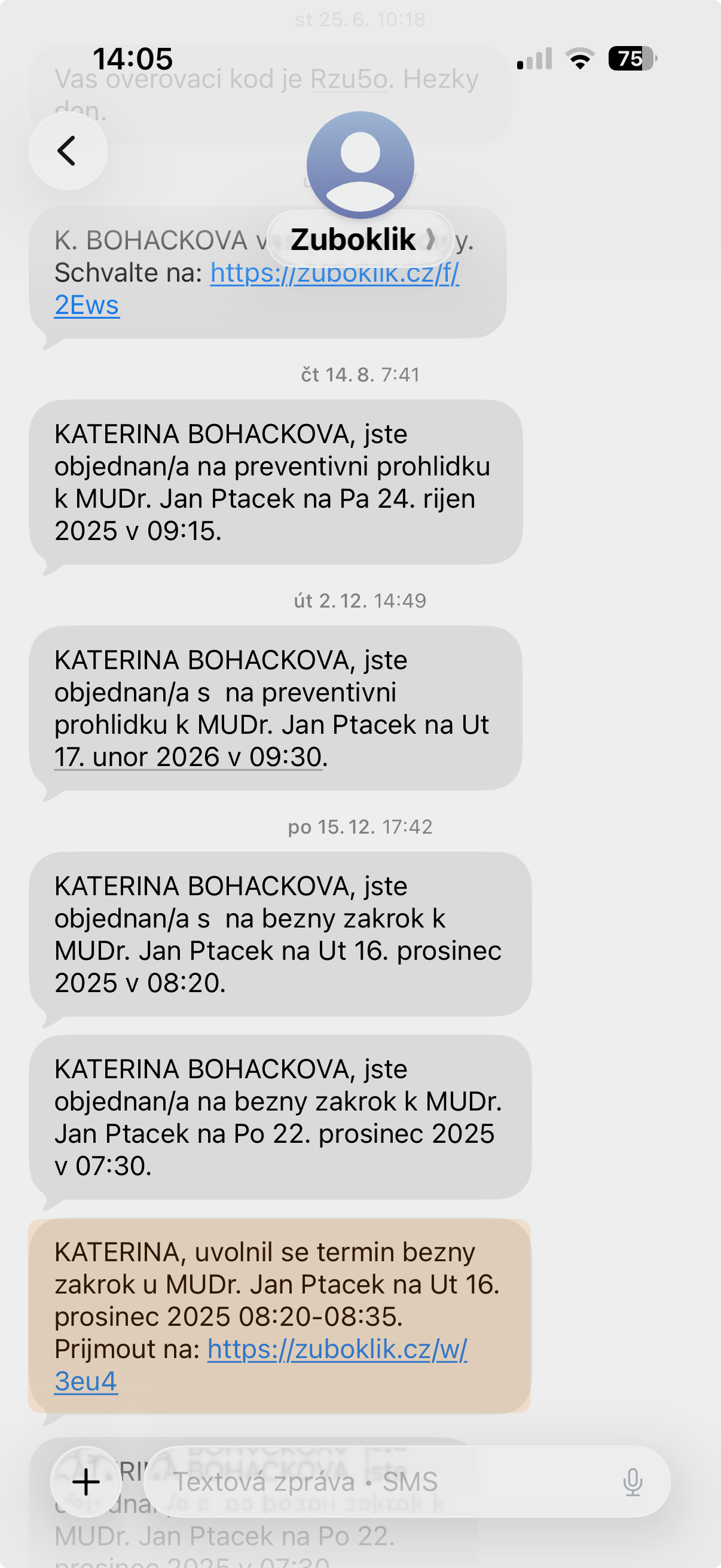
System automatically sends booking confirmation and reminder 2 days before visit. You don't have to do anything.

Up to 80% fewer missed visits
No calling patients
Patients arrive prepared
lightbulb

Patient books for Tuesday. Sunday morning gets SMS: 'Reminding your visit at Dr. Nováková's practice tomorrow at 14:00.' If they forget the appointment, there's still enough time to arrange the visit.

Automatic SMS reminders

For Practice

Intelligent Calendar Management

Calendar that knows what it's doing. Automatically calculates times, guards insurance rules, alerts for holidays and watches for collisions.

timer

Time calculation by symptoms

When patient books online, system intelligently calculates time: combines related symptoms into one time, distinguishes acute vs preventive care, respects insurance rules. During manual booking the nurse gets a suggested estimate as a badge — she can enable it per-user. The nurse still sets the time herself, but she does not have to start from scratch.

Automation for patients, guidance for nurse
Intelligent estimate right in the nurse form (badge)
Can be turned on/off per nurse
Accurate planning without manual estimation
Respects urgency and insurance
Time calculation by symptoms
policy

Insurance rules for prevention

System knows how many preventions insurance covers (e.g. 2x yearly children free, 1x adults free, additional for 550 CZK). Automatically checks if patient is eligible.

No mistakes with prevention billing
Patients see if they pay
Automatic 'to be paid' marking
Insurance rules for prevention
groups

Secured data access

Doctor views specific day, nurse administers whole month, both get updates immediately. Both nurse and doctor can change any appointments. Patients change only their own appointments.

No overlapping appointments
Overview for whole team
Access secured by roles
Oversight through event log
Secured data access
schedule

Flexible office hours

Set office hours for each day of week. Different opening times on Monday and Friday? No problem. System respects your hours and offers only appointments during opening time.

Different hours for each day
Possible lunch break
Reserve at end of day
Flexible office hours
calendar_month

Yearly calendar overview

Whole year on one screen - 12 miniature calendars showing workload overview for each month. Quickly see where it's full and where you have free periods for vacation or maintenance.

Strategic vacation planning year ahead
Visual identification of free periods
Quick jump to specific month by clicking
No clicking through month by month
Yearly calendar overview
emergency

Acute gaps for urgent cases

Reserve time in your schedule specifically for urgent cases - patients with urgent pain who can't reach the practice within a few hours. Patients can find and book urgent appointment online without having to call the practice.

Flexible time reserve in schedule
Patients can find urgent appointment themselves online
Automatic time division when creating urgent booking
Practice handles urgent cases without interruption
Acute gaps for urgent cases
schedule

Automatic daily creation of acute gaps

Every morning system automatically creates acute gaps for whole day according to your settings. You define what time and how long gaps should be reserved (e.g. 8:30 for 30 minutes, 10:30 for 30 minutes, 13:30 for 30 minutes), and system creates them on its own without your intervention. Gaps are planned months ahead and system intelligently skips weekends, holidays and respects office hours.

No manual work - system creates gaps automatically
Consistent planning months ahead
Intelligent skipping of weekends and holidays
Automatic prevention of collisions with regular appointments
Configurable times and gap duration
You always have reserve for urgent cases
Automatic daily creation of acute gaps
warning

Conflict detection when changing work hours

When office hours change, system automatically finds all appointments that are now outside new time. Displays red banner with warning and list of patients that need to be rebooked. Everyone on team sees it immediately.

Automatic warning when calendar has problem
Clear list of all conflicting appointments
Real-time update for whole team
Easy rebooking to new time
Conflict detection when changing work hours
today

Daily overview TODAY

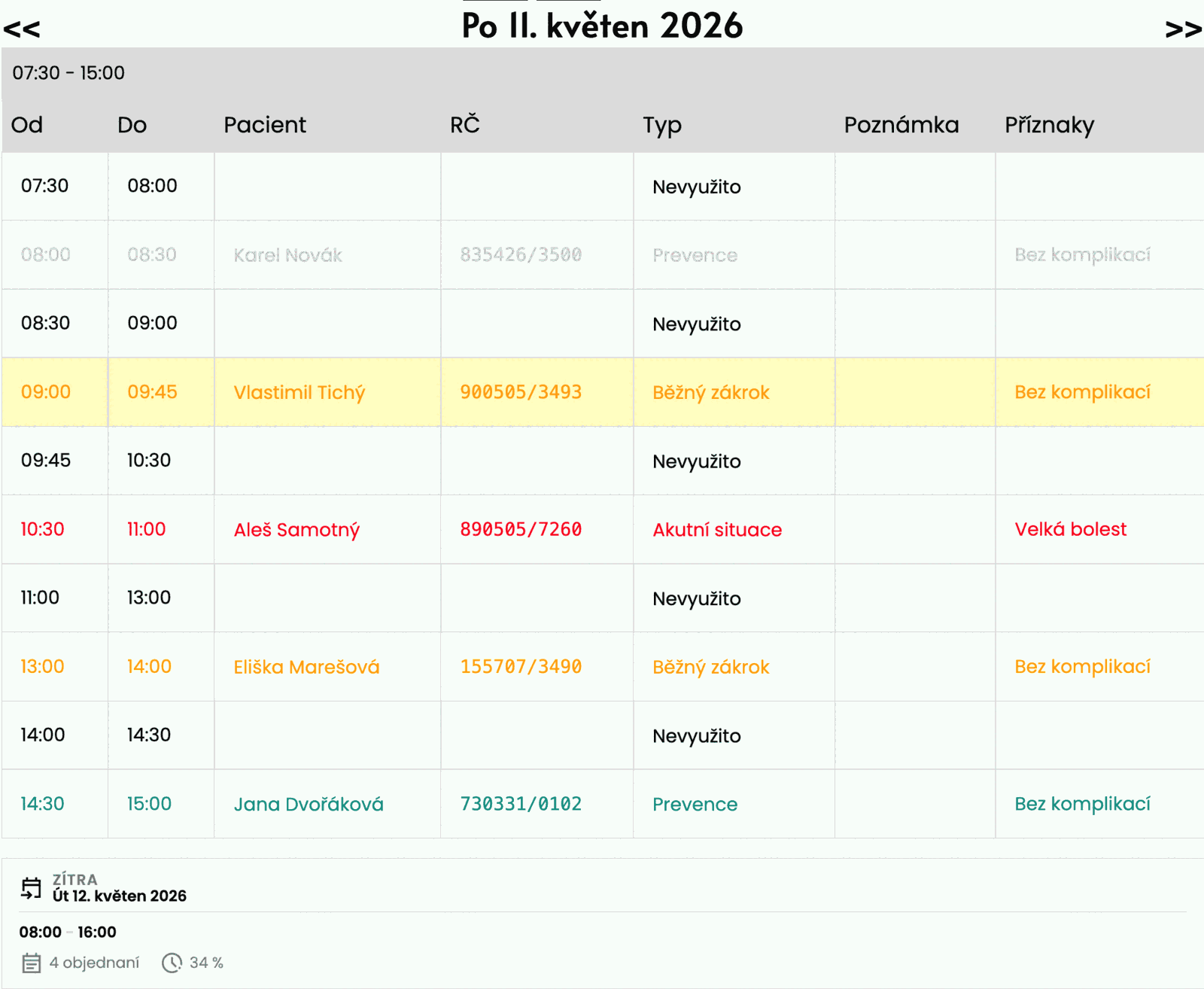
Table list of all today's appointments with automatic highlighting of current patient. Doctor sees at one glance who already was (gray), who is right now (highlighted), and who's coming (normal). Selection changes automatically as time passes. The overview also shows free slots (green) and acute gaps (red), holiday and vacation info, and you can confirm a patient's arrival or no-show with a single click from the row.

Instant overview of all today's patients
Color distinction: past, current, future
Free slots in green, acute gaps in red
Holiday and vacation info right in the overview
Confirm arrival / no-show directly from the row
Automatic current patient switching by time
Option to search patient directly from overview
Daily overview TODAY
sync

Real-time team synchronization

When nurse creates appointment, doctor sees it in calendar immediately without page refresh. Everyone in practice works with same data at exactly same moment. No page refresh needed.

Instant update for everyone without refresh
Everyone sees same data at exactly same time
Automatic collision prevention
Live calendar for whole team
Real-time team synchronization
note_add

Notes for the day

Add note for the day for team (e.g. 'technician coming today'). Text can be formatted, for example highlight important information.

Sharing important information for whole team
Multiple lines possible
Easy editing
Rich text editor for notes
Pin a selected day – quick return with one click
Notes for the day
splitscreen_top

Reservation blocks

Reserve time for lunch, administration or practice preparation - reservation blocks take space in calendar and patients don't see them as available slots.

Time blocking in calendar
Flexible time reserve for lunch and administration
Patients cannot book time in reservation blocks
Note in block about reason
'Substitute' record type for days another doctor is on duty
Reservation blocks
restaurant

Automatic lunch break

Lunch break is automatically created for each day separately according to your configured times. Set lunch breaks for individual days of week. System will automatically create breaks for days you configure here.

No manual work - system creates breaks automatically
Consistent planning months ahead
Intelligent skipping of weekends and holidays
Automatic prevention of collisions with existing appointments
Configurable start time and duration for each day
Practice has reserved lunch time every day
Automatic lunch break
history

Audit log - History of all changes

Complete record of all events in system - who created appointment, who changed it, who received SMS. In disputes you have evidence. Can filter by patient and see chronological list with timestamps.

Transparent history of all calendar actions
Traceability in disputes
Records all changes including SMS sending
Filtering by patient
Audit log - History of all changes
palette

Colored icons in event history

Event history displays colored icons for faster orientation. Each event type has its color - appointment creation in green, cancellation in red, SMS in blue, changes in yellow. At first glance you see what happened.

Faster orientation in event history
Visual distinction of action types by color
Easy identification of problematic events
Clear chronological overview
Colored icons in event history
person_off

Patient deactivation

Mark inactive patients directly in patient card. You can record deactivation reason - patient moved away, changed dentist, is problematic or deceased. Deactivated patients are visually distinguished throughout system.

Mark inactive patients with reason
Visual distinction of deactivated in calendar
Patient history remains preserved
Option to reactivate anytime
Patient deactivation
how_to_reg

Patient arrival confirmation

For each appointment you can mark whether patient arrived or didn't show up. 'Did not show up' checkbox allows quick recording of absence. Information is displayed in history and helps identify problematic patients.

Quick no-show marking with one click
Absence record in patient history
Overview of patient reliability
Data for possible sanctions
Patient arrival confirmation
trending_up

Dynamic symptom reordering

System learns from your data. Every night it automatically recalculates which symptoms practice most frequently handles in last month. Most used symptoms move to top of list - nurse has them at hand without configuring.

Automatic learning from practice patterns
Most frequently used symptoms always on top
No manual management, system handles it
Increases work speed based on real usage
Dynamic symptom reordering
beach_access

Vacations and operation suspension

Plan vacation or practice closure in calendar. System automatically blocks online booking for these periods. Patients see practice is closed and cannot book. Each day is marked with water icon.

Easy vacation planning in calendar
Automatic blocking of online booking
Visual marking of closed days
Option to add note (absence reason)
Vacations and operation suspension
upload_file

Patient import from PCDENT

Have 500 patients in PCDENT? Import them in 15 minutes instead of 15 hours of manual copying. System parses data, checks duplicates, creates patients.

Fast setup without manual copying
Automatic processing
Duplicate check and elimination
Patient import from PCDENT
lock

Appointment collision validation

System checks that appointment doesn't overlap with another. When trying to create conflicting appointment, error message appears. Form stays open for time adjustment. Guaranteed protection against double-booking even when multiple people book simultaneously.

Model-level validation - cannot be bypassed
Prevention of two appointments at same time
Error message when conflict detected
Protection against human error and concurrent requests
Appointment collision validation
restore_from_trash

Trash (soft-delete)

Nurse accidentally deletes an appointment or a patient? Deleted records don't disappear forever — they go to the trash. Restore them with one click, set how long they are kept and the system automatically purges them every day after the retention period expires. Need to move a record elsewhere? Just cut and paste via clipboard — patient, type, note and duration all carry over to the new slot.

Easy restoration of deleted records
Configurable retention period
Automatic daily cleanup
No fear of mistakes
Cut / paste record via clipboard to a new slot
Trash (soft-delete)
star Exkluzivní funkce

For Nurses - Advanced Features

Text Search for Appointments

Unique feature for fast finding suitable appointments using natural language.

search

Search by text in Czech

Nurse enters request in natural language: 'IN WEEK 25 MINUTES MONDAY MORNING' and system finds exactly matching appointments.

Fast patient checkout after procedure
No clicking through calendar
Intuitive for every nurse
keyboard

Flexible syntax

System understands different notations!

IN 2 WEEKS 30MIN THURSDAY AFTERNOON
NEXT WEEK 15 MINUTES MORNING
TOMORROW 20 MINUTES
ODD WEEK MONDAY 30 MIN
EVEN WEEK WEDNESDAY MORNING
MARCH 45 MINUTES AFTERNOON

For Nurses

Less Administration, More Time for Work

Nurse can focus on work in practice instead of phone.

edit_calendar

Fast work with entries

Nurse works with entries directly in calendar - changes visit type, moves appointments, adjusts time, adds notes to day. Interface designed from practice for maximum speed. Everything in few clicks.

Change visit type in seconds
Lightning-fast appointment moves
Notes to day for whole team
Designed for daily routine
Fast work with entries
calendar_view_month

Monthly view with procedure type icons

Nurse sees whole month at one glance - color-coded visit types (prevention, procedure, acute). Symptom icons directly next to patient name. Marking of full/empty days. Instant orientation in practice workload.

Overview of whole month's workload
Visual distinction of visit types
Symptom icons directly in calendar
Identification of full and free days
Monthly view with procedure type icons
schedule

Daily view with time slots

Nurse clicks on day and sees timeline from 8:00 to closing time. Each patient is colored block with name, times, symptom icons and visit duration. Hover over name shows phone number or birth number. Day note is visible to everyone.

Detailed timeline of specific day
Visual blocks with symptoms and duration
Easy to identify empty slots
Quick editing directly from view
Daily view with time slots
manage_accounts

Patient management - search, edit, delete

Nurse manages complete patient database. Creates new records, edits data (phone, name), sends SMS. Fast search by name, PIN or birth date. Can delete inactive records (GDPR compliance). All changes are recorded in history.

Centralized patient database
Search after 3 characters - live results
Edit data - phone, name, birth number
Deletion with GDPR compliance
Patient management - search, edit, delete
auto_awesome New

For Staff

AI Assistant Right in Your Practice

Ask in Czech how to do anything in the system — no support calls, no hunting through help docs. The assistant knows Zuboklik from the inside and answers matter-of-factly.

quick_reference

Always at hand

Open the drawer in the header with one click anytime during work — no window switching.

history

Conversation history

Every question and answer is saved. You can return to a previous procedure or pick up where you left off.

markdown

Markdown answers

Clear answers with formatting — bullets, headings, emphasis. No walls of text.

verified_user

Internal expert mode

The assistant answers only from Zuboklik documentation. It never invents procedures that don't exist in the system.

info

The assistant is for practice staff — it helps with operating Zuboklik. It is not AI diagnostics and does not communicate with patients.

Practical Use Cases

How Zuboklik works in practice

1

Doctor's morning preparation

Doctor arrives at work at 7:30. Opens Zuboklik dashboard and selects daily overview. Sees that today technician comes and 20 patients. First patient has prevention, second fallen filling, third acute pain. Prepares necessary material. Easy.

Doctor's morning preparation
2

Fast booking with text search

Patient just finished treatment and asks for appointment next week Monday morning, 25 minutes. Nurse types 'IN WEEK 25 MINUTES MONDAY MORNING' - system immediately offers matching slots. In 10 seconds patient is booked.

Fast booking with text search
3

Family prevention

Mrs. Nováková wants to book prevention for whole family (4 people). Logs in using birth number and PIN. Selects 'prevention' for herself, husband and two children. System offers her four appointments in a row on Thursday afternoon. Everyone is booked in 3 minutes.

Family prevention
4

Patient changes appointment

Mr. Svoboda has appointment Wednesday 14:00 but has to go to work. Opens Zuboklik - clicks 'Book appointment'. Selects his appointment. Clicks 'Move'. System offers other free appointments. Selects Thursday 16:00. Done. Nurse didn't have to solve anything.

Patient changes appointment
5

New patient in practice

New patient arrives without appointment. Nurse adds them to system - enters name, birth number, phone. Patient is in database. Next time they can book themselves online. Just enter birth number and get SMS PIN.

New patient in practice

Try All Features Free

30 days without limits, no credit card

Questions About Features

Answers to most common questions

Zuboklik runs alongside your software

It does not replace Xdent, Dent21 or PC DENT. It handles booking only and you can import patients in 15 minutes.

join_inner

Alongside practice software

Zuboklik does NOT replace your existing system. It runs alongside it, handles booking only and you transfer patients in 15 minutes.

sms

SMS gateway

Sending SMS notifications through Czech SMS gateway. SMS are charged separately at 1.20 CZK. Live SMS count in the header – always know how many messages remain and how fast the credit is being spent.

upload_file

Patient import

Import from PCDENT, XML, JSON, CSV. Fast upload of existing patient database.

bug_report

Bug report button

Report a bug straight from the app – the button automatically attaches the current screen as a screenshot. Our team gets full context and responds faster. A quality-of-support argument you can count on.

Security Technical Details

For those who want certainty about data security

dns

Multi-tenant architecture

Each practice has own subdomain (zuboklik.cz/oto_novak). Data is strictly separated. No practice sees another practice's data.

lock

Data encryption

Sensitive data (birth numbers, health information) is encrypted in database. We use AES-256 encryption.

shield

GDPR compliant

Full GDPR support. Patients can request data deletion. Audit log of all access to sensitive data. Servers in EU.

health_and_safety

Backup and availability

99.9% uptime. Automatic backups every 6 hours. Redundant servers. Monitoring 24/7.

Book Appointment